
The freelance landscape is shifting beneath our feet. A relentless tide of artificial intelligence is reshaping how we work, communicate, and deliver value. Consequently, a pressing question now occupies the mind of every independent professional: not if AI will affect their business, but how to use AI in freelancing not just to survive, but to profoundly thrive. The fear of replacement is a powerful motivator; however, the opportunity for reinvention is exponentially greater. This comprehensive guide, therefore, moves beyond the theoretical debate. Instead, we will delve into a practical, step-by-step framework for integrating AI into your daily operations. We will explore specific tools for automation, strategies for client management, and methods for upskilling. Ultimately, this resource will empower you to transform AI from a disruptive threat into your most powerful collaborative partner.
The New Foundation: Understanding the AI-Augmented Freelancer
Before diving into tools and tactics, it is crucial to establish the right mindset. The goal is not to compete with AI on speed or cost. Conversely, the goal is to synergize your uniquely human skills with AI’s computational power.
An AI-augmented freelancer utilizes technology to automate repetitive and time-consuming tasks. This strategic delegation, consequently, frees up mental space and hours in the day. You can then focus on high-value activities that AI cannot replicate: building deep client relationships, developing creative strategy, solving complex, nuanced problems, and providing empathetic oversight. Essentially, you become the conductor of an AI orchestra, guiding the tools to create a symphony of efficiency and quality. According to a recent study by Freelancers Union, over 60% of freelancers using AI report increased productivity and the ability to take on more complex projects. This statistic clearly illustrates the tangible benefits of learning how to use AI in freelancing effectively.
The Core Philosophy: AI as an Intern, Not a Replacement
A helpful mental model is to treat AI as a brilliant, incredibly fast, but context-blind intern. You would not let an intern autonomously manage a client relationship or make final strategic decisions. Similarly, you would not manually complete a task that your intern could draft perfectly in ten seconds. You assign the foundational work to the AI; then, you apply your expertise to review, refine, and elevate that work. This philosophy is the cornerstone of integrating AI into your freelance workflow successfully.
A Practical Framework: How to Use AI in Freelancing Across Your Workflow
Let’s break down the freelance journey into key stages and identify precise applications for AI at each step. This is the actionable core of how to use AI in freelancing.
Stage 1: Client Acquisition and Proposals
The first challenge is often finding and winning work. AI can dramatically streamline this process.
- Lead Generation and Research: Use AI tools like ChatGPT to analyze a potential client’s website and social media. You can prompt it to: “Identify three key business challenges for [Company Name] based on their ‘About Us’ page and latest blog posts.” This provides you with tailored talking points for your outreach. Furthermore, tools like Lavender can analyze your email drafts and suggest improvements to increase response rates.
- Proposal and Pitch Creation: Instead of starting from a blank page, use AI to draft compelling project proposals. For instance, you can provide an AI with the project brief and ask it to: “Generate a formal project proposal outline for a website redesign, including sections on objectives, methodology, timeline, and budget options.” You then personalize this draft, inject your unique voice, and ensure it aligns perfectly with the client’s stated needs.
Stage 2: Project Execution and Delivery
This is where AI for freelance productivity delivers the most dramatic time savings.
For Developers and Coders:
- Intelligent Code Completion: Tools like GitHub Copilot and Amazon CodeWhisperer act as an autocomplete on steroids. They suggest whole lines of code, entire functions, and even unit tests based on the context of your project. This not only speeds up development but also helps you learn new languages and frameworks.
- Debugging and Optimization: You can paste a problematic code snippet into ChatGPT or a similar LLM and ask it to “debug this Python function that is returning a null error.” The AI will often identify the issue and suggest a corrected version. Similarly, you can ask it to “optimize this SQL query for faster performance.”
Attention Designers and Creatives:
- Rapid Ideation and Mood Boards: Platforms like Midjourney and Stable Diffusion are invaluable for visual brainstorming. You can generate hundreds of concepts for a logo, illustration, or website layout in minutes based on text prompts. This allows you to present a wide range of visual directions to a client before you invest hours in refining a single concept in Adobe Illustrator or Figma.
- Asset Creation and Manipulation: Adobe’s Firefly, integrated into Photoshop, allows you to use generative fill to extend images, remove objects, or create new elements using text commands. This eliminates tedious manual editing work.
To Writers and Marketers:
- Overcoming the Blank Page: Use tools like Jasper or a carefully prompted ChatGPT to create first drafts, generate blog post outlines, or brainstorm headline variations. The key is to provide very specific, detailed prompts to get a useful output that you can then refine.
- Editing and Polishing: Tools like GrammarlyGO and Writer.com not only check for grammar but can also help you adjust the tone, clarity, and conciseness of your writing to better suit the target audience.
Stage 3: Business Administration and Growth
The “business” side of freelancing is often where time slips away. Here, automating freelance tasks with AI is a game-changer.
- Administrative Automation: Use Otter.ai to transcribe client calls and meetings automatically. Then, you can use another AI tool to summarize the key decisions and action items from that transcript. This ensures nothing is missed and saves you from manual note-taking.
- Financial Management: AI-powered tools like QuickBooks can now categorize expenses, track mileage from your phone’s location data, and even provide cash flow forecasts based on your invoicing history.
- Continuous Learning: AI can curate your personal learning path. You can ask a chatbot: “I am a freelance front-end developer skilled in React. Create a 4-week learning plan to understand how to integrate OpenAI’s API into a web application.” It will provide a structured list of resources and project ideas.
Elevating Your Value: Strategic Integration for Higher Rates
Once you’ve mastered the basics of how to use AI in freelancing for efficiency, the next step is to leverage it for strategic advancement. This is how you justify raising your rates.
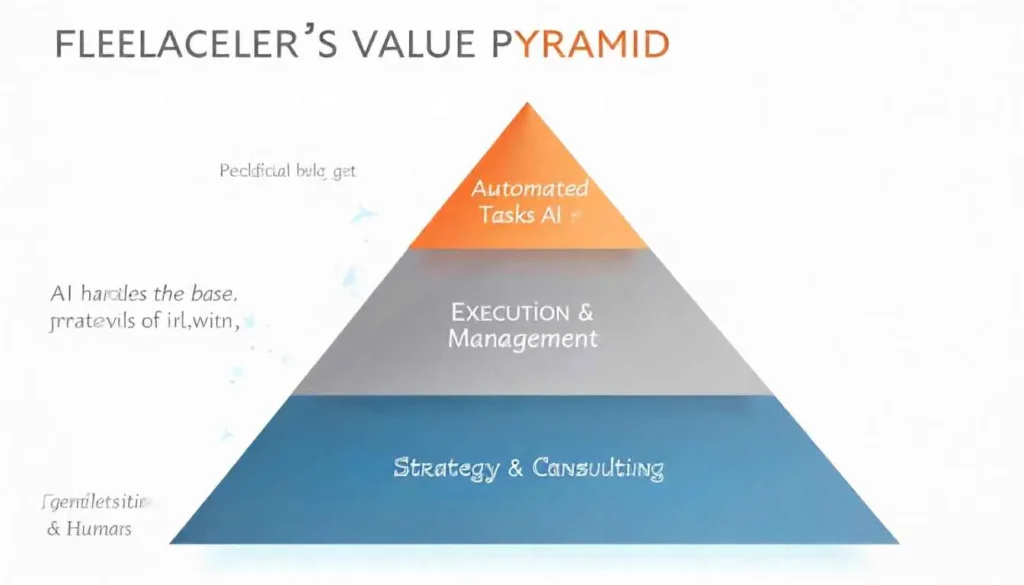
Shifting from Executor to Strategic Consultant
Your new value proposition is not that you do the work faster, but that you oversee a more sophisticated, AI-powered process that delivers superior outcomes. Frame your services accordingly.
Instead of saying “I will write 10 blog posts,” you now offer a “Content Strategy and AI-Optimized Production Package.” In this package, you use AI for research and drafting, but your primary value is in strategic keyword planning, audience analysis, final editorial polish, and performance analytics. You are selling your judgment and expertise, not just your typing speed. For more on defining your niche, check out our guide on gillibilli.shop.
Offering New, High-Value Services
Learning how to use AI in freelancing allows you to expand your service menu. You can become the AI expert your clients need.
- AI Integration Specialist: Help clients integrate specific AI tools (like a chatbot or a content analysis API) into their own workflows and websites.
- Prompt Engineering Services: Many businesses have AI tool access but lack the skill to use them effectively. You can offer your services as a prompt engineer, crafting the precise instructions that generate high-quality marketing copy, code, or visual assets for them.
- AI Workflow Auditor: Analyze a client’s business processes and identify key areas where AI-powered freelancing strategies and automation could save them time and money, presenting them with a tailored implementation plan.
Navigating the Ethical Landscape and Maintaining Quality
As you integrate these powerful tools, it is vital to maintain professional integrity and quality control.
First, always fact-check and verify AI output. AI models can “hallucinate” and present incorrect information or flawed code with complete confidence. Your expertise is the essential filter for truth and accuracy.
Second, be transparent with clients. You do not need to reveal every tool in your toolbox, but it is ethical to discuss that you use modern technology, including AI, to enhance efficiency and outcomes. Position it as a benefit to them, aster turnaround, more thorough research, or lower costs.
Finally, protect client confidentiality. Never input sensitive, proprietary, or non-public client information into public AI models. Use tools with robust data privacy policies, or better yet, use API integrations that do not retain data for model training.
Conclusion: Your AI-Powered Freelance Future Starts Now
The question is no longer if you should adapt, but how quickly you can master the new paradigm of how to use AI in freelancing. The initial wave of anxiety is giving way to a clear path forward. This path is not about passive observation; instead, it demands active participation and a commitment to continuous learning. By systematically integrating AI into your client acquisition, project execution, and business management, you are not just protecting your livelihood, you are actively future-proofing it. You are building a more resilient, scalable, and profitable practice. The freelancers who will lead the next decade are those who see AI not as a finish line, but as a powerful catalyst for their own boundless creativity and strategic genius. Therefore, the time to begin is not tomorrow; it is today. Your augmented potential awaits.
All images are generated by Freepik.
Frequently Asked Questions
The easiest first step is to identify your single biggest time sink. Is it writing client emails? Coding boilerplate functions? Creating design mockups? Then, find one AI tool that addresses that specific task (e.g., Grammarly for emails, GitHub Copilot for code). Master it for that one purpose before expanding.
Absolutely. While AI may speed up task completion, your value shifts to strategic oversight, complex problem-solving, and guaranteed quality. You are charging for your expert judgment and the ability to manage a more sophisticated, high-output workflow, which delivers greater value to the client.
The key is the “human touch.” AI generates a first draft; you provide the final version. Infuse the work with your unique style, voice, and creative flair. For code, add elegant architecture and clever solutions. A writing note, inject personal anecdotes and nuanced opinions. To design, ensure visual harmony and brand alignment that AI cannot fully grasp.
Yes, primarily around data privacy, copyright, and accuracy. Never input confidential client data into public AI chats. Be aware that the legal landscape around AI-generated content and copyright is still evolving. Most importantly, always thoroughly vet AI-generated code and facts for errors.
A large language model (LLM) like ChatGPT Plus or Claude is the most versatile starting point. It can assist with writing, brainstorming, outlining, basic planning, and even simple code snippets. It acts as a central, multi-purpose brain for a wide array of administrative and creative tasks.