
The sun is up, but so are you, staring at a screen that holds a dozen tabs, three project deadlines, and a blinking cursor on an unanswered email. The freedom of freelancing is undeniable, but the constant pressure to manage every aspect of your business can be overwhelming. Consequently, the line between a productive day and a path to burnout is dangerously thin. The secret weapon of the most successful freelancers isn’t superhuman willpower; it’s a strategic arsenal of freelance productivity tools and systems. Therefore, this guide is more than a list of apps; it’s a blueprint for designing a workflow that maximizes your output while fiercely protecting your well-being. Ultimately, we will explore the essential categories of tools and the philosophies behind using them to build a sustainable, profitable, and enjoyable freelance career.
The Foundation: Why Systems Trump Willpower Every Time
Before we dive into specific freelance productivity tools, a crucial mindset shift is required. Relying on memory, motivation, or frantic to-do lists is a recipe for stress and missed deadlines.
Your brain is for having ideas, not for holding them. The goal of implementing these tools is to create an external system you can trust. This system, often called a “second brain,” handles the minutiae of scheduling, task management, and client communication. Consequently, this frees up your mental energy for the deep, creative work that your clients actually pay you for. Furthermore, a reliable system reduces the cognitive load that leads to decision fatigue, a primary culprit behind procrastination and burnout.
The Four Pillars of a Productive Freelance System
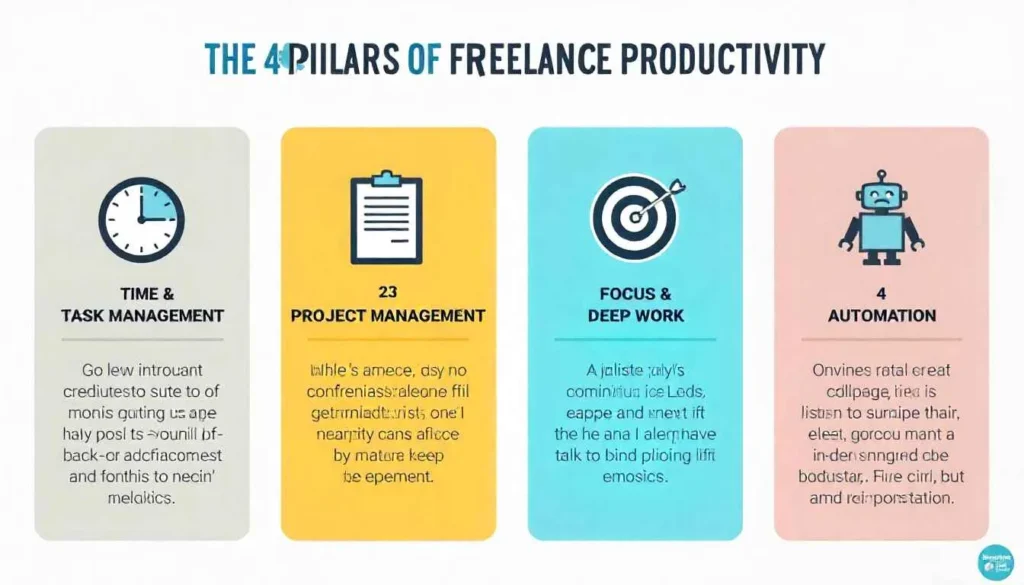
A robust freelance workflow stands on four key pillars. Your choice of freelance productivity tools should serve these pillars:
- Time & Task Management: Knowing what to do and when to do it.
- Project & Client Management: Keeping client work organized and communication clear.
- Focus & Deep Work: Protecting your attention from endless distractions.
- Automation & Administration: Streamlining the repetitive tasks that drain your time.
Essential Freelance Productivity Tools for a Flawless Workflow
Let’s break down the best tools available for each pillar of your business. Remember, the goal is not to use all of them, but to build a stack that works seamlessly for you.
Pillar 1: Mastering Time & Task Management
This is the core of your daily operation. Without clarity here, everything else falls apart.
- Todoist: This is a powerhouse for task management. Its intuitive interface allows you to create projects, set priorities, and establish recurring due dates. The “Today” and “Upcoming” views are invaluable for providing a clear, manageable picture of your day without feeling overwhelmed by the entire project list.
- Toggl Track: If you bill by the hour or simply want to understand where your time is going, Toggl is essential. With one click, you can track time for any task or client. The reports are eye-opening, revealing which projects are profitable and which are time sinks. This data is crucial for refining your pricing and workflow.
- Google Calendar (or Outlook Calendar): Your calendar should be your command center for when you work, not just what you’re doing. Use it to block out time for specific tasks, a method known as time-blocking. Schedule blocks for “Client Project A,” “Admin Work,” and, most importantly, “Lunch” and “Focus Time.” For more about Time Management for Freelancers: How to Stay Productive Without Burning Out, explore Dalton Craighead.
Pillar 2: Streamlining Project & Client Management
Juggling multiple clients requires a single source of truth for each project.
- Notion: This is the ultimate all-in-one workspace. You can build a complete freelance dashboard to track projects, create client portals, manage your CRM (Customer Relationship Management), and even write your blog posts. Its flexibility is its greatest strength, allowing you to customize it to your exact workflow.
- Trello or Asana: These visual project management tools are perfect for managing the stages of a project. Using a Kanban-style board (like “To Do,” “Doing,” “Done”), you can see the status of every task at a glance. They are also excellent for collaborating with clients or subcontractors.
- Slack (or Discord): For ongoing communication with clients or teams, a dedicated chat app is far more efficient than a cluttered email inbox. It keeps conversations organized by topic or project and reduces formalities, speeding up decision-making.
Pillar 3: Defending Your Focus & Deep Work
In a world of notifications, your ability to focus is your most valuable asset.
- Freedom: This app is a game-changer for eliminating digital distractions. You can block distracting websites and apps across all your devices for set periods. Scheduling a “Freedom” session to coincide with your time-blocked deep work is a guaranteed way to boost output.
- Forest: This app uses a clever psychological trick. You set a timer to focus, and a virtual tree begins to grow. If you leave the app to check social media or another distraction, the tree dies. It’s a simple but powerful visual motivator to stay on task.
- Noise-Canceling Headphones: While not software, this is a critical physical tool. Paired with focus music or ambient sounds (like from Noisli or Brain.fm), they create an impenetrable bubble of concentration, whether you’re at home or in a coffee shop.
Pillar 4: Automating the Administrative Grind
The less time you spend on repetitive tasks, the more you can spend on billable work.
- Calendly or SavvyCal: Eliminate the endless email chain for scheduling calls. These freelance productivity tools sync with your calendar and allow clients to book meetings directly in your available slots. This small automation saves a surprising amount of mental energy and time.
- Zapier or Make: These are the power users of automation. They connect the different apps in your workflow. For example, you can create a “Zap” that automatically creates a task in Trello when you receive an email with a specific label, or adds new Calendly bookings to your Google Calendar and Notion dashboard simultaneously.
- QuickBooks or FreshBooks: These tools automate invoicing, expense tracking, and tax estimates. Setting up recurring invoices for retainer clients and connecting your bank account for expense import turns a day of financial dread into a few clicks.
Building a Burnout-Proof Schedule with Your Tools
Owning the tools is one thing; using them to build a sustainable routine is another. Here’s how to weave them together.

First, time-block your week every Monday morning. Use your calendar to schedule not just client work, but also business development, learning, and personal time. This ensures you are proactive, not reactive.
Secondly, practice the “Shutdown Ritual.” At the end of each workday, spend 10 minutes in your task manager (like Todoist). Review what you completed, plan your top 3 priorities for tomorrow, and then close the app. This ritual signals to your brain that work is over, which is vital for preventing burnout and maintaining work-life balance.
Finally, track your time for two weeks. Use Toggl to audit where your time is actually going. You may discover that administrative tasks are consuming 30% of your week, indicating a pressing need for more automation. For more about Time Management for Freelancers: How to Stay Productive Without Burning Out, visit our guide on gillibilli.shop.
Conclusion: Your Productivity, Your Rules
In conclusion, mastering time management as a freelancer is not about squeezing more hours from the day. It is about working smarter by leveraging a curated set of freelance productivity tools to create a system that serves you. These tools are the scaffolding that supports your creativity and ambition, preventing the collapse that leads to burnout. Therefore, start small. Pick one tool from one pillar, perhaps a time tracker or a task manager, and master it. Then, gradually build your stack. Remember, the goal is not to be busy; it is to be effective. By taking control of your systems, you take control of your time, your business, and ultimately, your freedom.
All images are generated by Freepik.
Frequently Asked Questions (FAQs)
While it depends on your workflow, a robust task manager like Todoist or a time tracker like Toggl Track often provides the most immediate and impactful return. They create the awareness and structure that all other tools build upon.
Most of the tools mentioned offer powerful free plans that are sufficient for many solo freelancers. As your business grows, the paid plans (typically $5-$15/month per tool) are a worthwhile investment for the time and stress they save.
The “one tool to rule them all” approach is a myth, but you can minimize your stack. Start with a core set: a task manager, a time tracker, and your calendar. Only add a new tool when you have a specific, recurring problem that your current stack cannot solve.
Procrastination is often a symptom of ambiguity or fear. Tools that promote focus, like Freedom (to block distractions) and Forest (to provide a visual commitment), are very effective. However, pairing them with a task manager where you break down large, scary projects into tiny, actionable steps is the real solution.
Frame it as a benefit to them. Explain that it will provide transparency into the project’s progress, centralize all feedback and assets, and ultimately ensure their project is delivered more efficiently and successfully. Offer a quick, 5-minute tour to onboard them.
Pingback: How to Transition from a Full-Time Job to a Full-Time Freelancer Smoothly -